


 en | USD


 CHAT WITH GODLIKE TEAM



Building Mods in Minecraft

- 4 min read
- 1 views
- 2 likes
Building in the Game
Every day, countless Minecraft server hosting players spend hours constructing, using both their time and in-game resources. Whether you're building simple houses or majestic fortresses, the process can feel exhausting—especially if your architectural skills aren’t top-notch. But don’t worry! If you struggle with design or just want to speed things up, building mods can be the perfect solution. These mods offer convenient features, such as automatic wall placement or ready-made buildings. While platforms like CurseForge provide a plethora of mods, choosing the right one can be daunting. We've done the hard work for you and curated the best building mods to simplify your Minecraft projects.
TIP
Mods to Enhance Building in Minecraft
When expanding your Minecraft world, one common challenge is the sheer amount of resources needed. This can be a significant obstacle, especially if you’re trying to create a spawn zone for your server or decorate your personal map. Fortunately, you have an arsenal of mods at your disposal to overcome these hurdles. These mods cover various Minecraft versions and support both Forge and Fabric, ensuring compatibility with different setups. Whether you manage a multiplayer server or enjoy single-player mode, adding these mods to our server is straightforward. Before installing mods, ensure your client is properly configured. Check out the list of building mods below and pick the one that suits your needs.
WorldEdit: An Architect’s Dream
First on the list is the widely popular WorldEdit, offering a comprehensive suite of features for builders. Need to replace blocks easily? Done. Want to create massive spheres, plant trees, or construct walls in seconds? No problem. From laying foundations to shaping roofs, WorldEdit lets players use in-game commands that, while complex, provide immense flexibility. Whether you’re a novice or a seasoned builder, this mod gives you complete control over your creations. WorldEdit is available for both Forge and Fabric, supporting several Minecraft versions, including 1.20 and 1.16.5.
TIP
Better Builder’s Wands: Survival with a Focus on Building
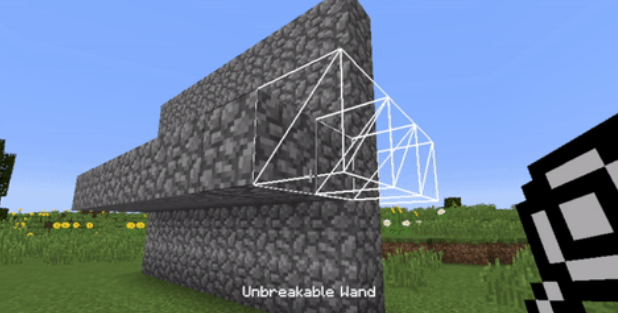
For those seeking a more immersive survival building experience, the Better Builder’s Wands mod is an excellent choice. This mod adds several craftable tools, each with unique building modes that allow players to easily customize their structures. Forget about complex commands—just press the M key to toggle between building modes. Whether you want to place blocks vertically or in various directions, this mod greatly enhances the building process. It’s compatible with Forge versions from 1.7.10 to 1.12.2 but doesn’t support Fabric.
Effortless Building: A Simpler Approach to Construction
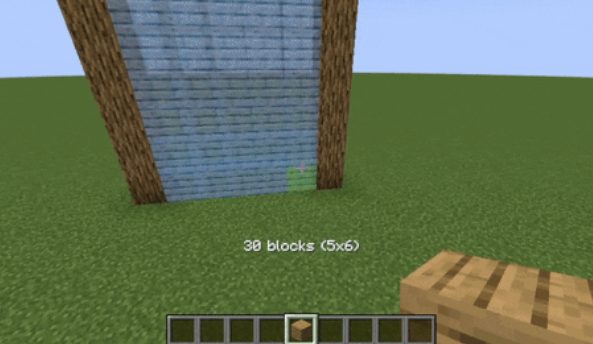
As the name suggests, Effortless Building simplifies the construction process with several modes for quickly placing and removing blocks. The only tool you need here is the ALT key—no commands required. Once activated, the mod displays an overlay showing exactly where blocks will be placed or destroyed. This feature is extremely useful for large-scale builds and is remarkably user-friendly. Currently available for Forge versions from 1.12.2 to 1.19.3, this mod is expected to receive updates for newer versions soon.
InstantBuildings: From Concept to Completion in Seconds
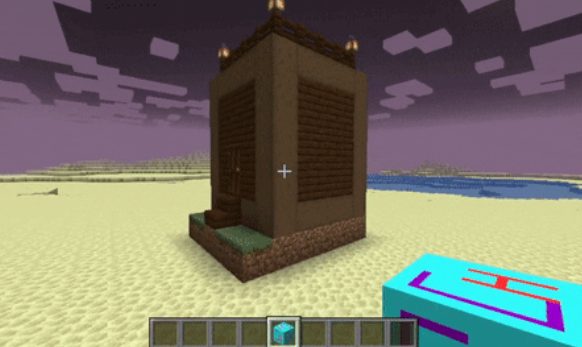
If you need a ready-made structure without manual labor, the InstantBuildings mod is your best bet. Supporting Forge versions from 1.14.4 to 1.16.5, this mod lets players summon pre-built structures with a single block. While initial placement can be tricky and irreversible, this mod saves time and effort, allowing you to focus on other aspects of the game. It’s also a great source of inspiration, as pre-made structures can spark new design ideas.
Conclusion
Whether you want to expand your creative possibilities or simply generate a building at the press of a button, these mods offer a wide range of options. Creating intricate bases or elegant structures in Minecraft can be a time-consuming process, but building mods can simplify it and make gameplay more efficient. We encourage you to try these mods and choose the one that best suits your next project. We hope this guide by Apex Hosting has helped you discover the best building mods in Minecraft. Good luck with your builds, players!
Enjoyed the article? Check out our News section for even more fascinating insights about your favorite games! Play together with GODLIKE.
Read Next
-
Copper Golem in Minecraft (2025): Status, Mods, Oxidation, Statue Build & FAQ
TL;DR There is no copper golem in vanilla Minecraft server hosting (Java or Bedrock) as of 2025. It was a Mob Vote 2021 candidate and didn’t make it into the base game. You can still use…
-
Minecraft Mods (1.21): Best Mods, Modpacks, and How to Install (Fabric, Forge, NeoForge)
TL;DR In Minecraft server hosting Java mods are .jar files loaded by Fabric, NeoForge (modern Forge fork), Forge, or Quilt. Put the mod in the /mods folder for the chosen profile. Minecraft: Java Edition is…
-
Smithing Table in Minecraft (1.21+): Recipe, Uses, Templates & Toolsmith Guide
TL;DR In Minecraft server hosting, the block’s core purpose is upgrading gear via smithing templates not repairing. The crafting recipe is simple: two iron ingots plus four planks of any wood. What it is: a…


