


 en | USD


 CHAT WITH GODLIKE TEAM



How to heal Pals in Palworld or Revive Pals Palworld?

- 3 min read
- 1 views
- 1 likes
Caring for strongest Pals in Palworld
Creat your own world with Palworld server hosting. When you encounter Wild Pals in the world of Palworld, there is a significant risk that your Pals may get injured or even be temporarily incapacitated. However, there are effective methods to quickly restore your Pal's health and prepare them for the next adventure.

Heal and Revive Pals Palworld
Healing and revival procedures in Palworld vary: for the former, food suffices, while the latter requires returning to base.
TIP
How to Heal Pals in Palworld?
To keep your Pals healthy, it's important to monitor their satiety level.
Open your inventory and go to the party tab. Here you will find the health indicators of your Pals. Maintaining the lower bar, which reflects hunger, will allow your Pal to recover HP in their Pal Sphere as long as the bar does not drop below a critical level.
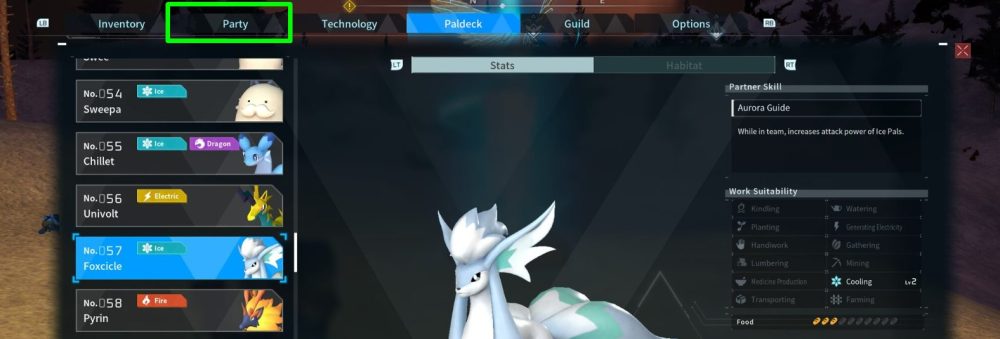
The game will notify you when you or your Pals are hungry. If the hunger indicator empties, the Pal will start losing HP but will not drop below 1HP.
Upon reaching level 10, you can activate the Feed Bag, which will automatically feed you and your Pals as long as it contains food.
How to Revive Pals Palworld?
Incapacitated Pals can be a major setback as they will not be able to participate in battles. This is especially critical if that particular Pal was key in the fight and dealt the most damage to enemies.
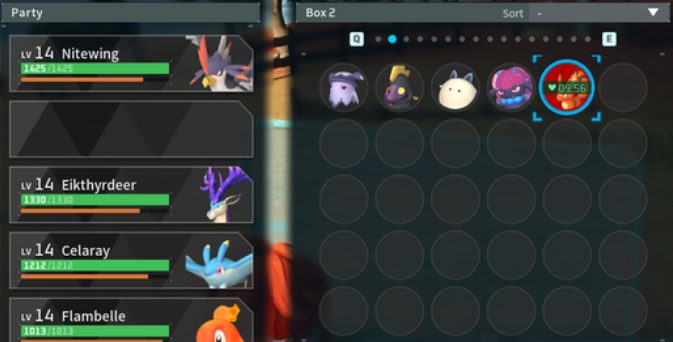
Reviving Pals requires additional effort. You need to return to one of the bases and use the Pal Box. There, you need to leave the incapacitated Pal for about 10 minutes, after which you can retrieve them.
NOTE
At night, the revival process can be sped up by sleeping in a bed while the Pal is in your inventory
Be particularly careful during battles to avoid incapacitating your Pal. Otherwise, you will have to interrupt your activities and return to base for their revival!
TIP
Enjoyed reading the article? Visit our Blog section to learn more interesting things about your favorite games! Play together with GODLIKE.
Read Next
-
Best Palworld Mods (2025): Install, Compatibility & Our Top Picks
TL;DR Palworld server hosting modding on PC (Steam/Game Pass) uses community loaders and a simple Mods folder + Mods.txt. For multiplayer, every player including the host must run the exact same build. Back up your…
-
Palworld Halloween Event 2025 (v0.6.8): Dates, Patch Notes, Rewards & How to Start
• Update Build: v0.6.8 • Platforms: PC/Steam, Xbox Series/One, PS5 TL;DR Start date: October 23, 2025 alongside the Palworld server hosting update v0.6.8. End date TBA. New content: a limited-time Halloween mission to unlock Zoe’s Halloween…
-
Best Palworld Server Hosting (2025): 12 Providers Compared & Ranked
Palworld Server Hosting Running your own Palworld server is the greatest method to play an open world survival game with a lot of strange creatures without lag. You’ll have more control, stability, and privacy. This…


