


 en | USD


 CHAT WITH GODLIKE TEAM



How to Use Meat Cleaver in Palworld

- 5 min read
- 1 views
- 0 likes
Meat Cleaver Palworld
The Meat Cleaver is a specialized tool in Palworld server hosting designed for butchering Pals to obtain meat. While meat can be found in the wild or obtained through other means, this tool gives the player full control over the process and allows for more efficient resource gathering.
TIP
Meat is essential for cooking food, which restores the player’s health and stamina while also improving the efficiency of Pals working at your base.
If you want to ensure a stable supply of food and resources, mastering the Meat Cleaver mechanic is an important part of your gameplay experience.

How to Craft the Meat Cleaver?
Before you can use the tool, you need to craft it. This requires completing a few steps.
1. Gather Required Materials
To craft the Meat Cleaver, you will need the following resources:
- Wood – collected by chopping trees or gathering fallen branches.
- Stone – mined from rock deposits scattered across the world.
- Ingots – created by smelting ore in a furnace.
2. Build a Primitive Furnace
A furnace is required to smelt ore into ingots. To craft it, you’ll need:
- 20 Wood
- 50 Stone
- 3 Flame Organs – obtained from fire-type Pals like Foxparks.
Once the furnace is built, place the ore in the material slot and use wood or coal as fuel. After a short period, you will obtain metal ingots, which are essential for crafting the cleaver.
3. Construct a High-Quality Workbench
To craft advanced tools, you need a High-Quality Workbench. You’ll need:
- 15 Metal Ingots
- 50 Wood
- 10 Nails (crafted from ingots at the furnace)
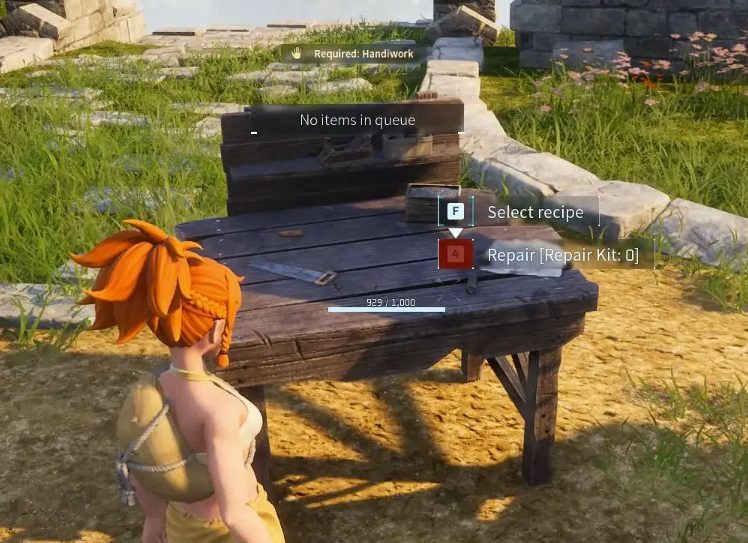
Once the workbench is built, you’ll unlock the ability to craft more advanced tools, including the Meat Cleaver.
4. Craft the Meat Cleaver
Finally, once you have all the necessary resources, follow these steps:
- Open the High-Quality Workbench
- Select the Meat Cleaver recipe
- Use 5 Metal Ingots, 20 Wood, and 5 Stone
- Start the crafting process
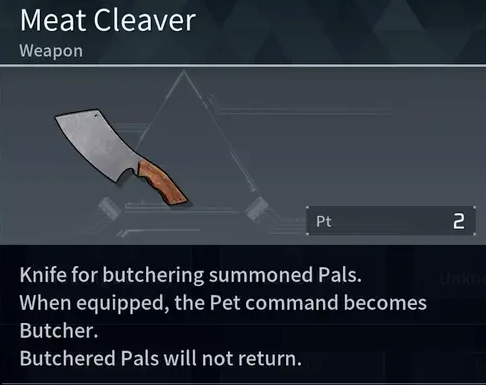
Once completed, the Meat Cleaver will be added to your inventory.
TIP
How to Use the Meat Cleaver in Palworld?
Now that you have the tool, it’s time to learn how to use it effectively.
1. Selecting a Pal for Butchering
In Palworld, some Pals can be butchered for meat, while others provide different materials like wool or hides.
To select a Pal for butchering, follow these steps:
- Open the Pal Management Menu at your base.
- Add the desired Pal to your active party.
2. Summoning and Commanding the Pal for Butchering
- Use the summon button to call the Pal.
- Open the command menu and select "Butcher Pal".

Once confirmed, the Pal will be permanently removed, and you’ll receive meat along with potential additional materials like hides or bones.
3. Cooking the Meat
Once you’ve obtained meat, you can:
- Cook it over a campfire or stove – restores more health and stamina.
- Use it in advanced cooking recipes – provides enhanced effects.
- Sell it to merchants – some NPCs buy meat for in-game currency.
Tips and Tricks
-
Not All Pals Should Be Butchered
- Some Pals are more useful as workers on your farm or as resource gatherers rather than for meat.
-
Use Pals for Automation
- Instead of gathering materials manually, assign Pals to work at mines, sawmills, or smelting stations to increase efficiency.
-
Monitor Morale at Your Base
- Butchering Pals can affect the mood of other Pals, especially if you butcher members of the same species frequently.
-
Store Meat in Refrigerated Containers
- Fresh meat spoils over time, so keeping it in storage chests with cooling will help preserve it longer.
Should You Butcher Pals?
Although the game mechanics allow players to butcher Pals for meat, some players may find this practice unsettling. However, as in many survival games, the choice is entirely up to the player.
If you prefer not to use Pals as a food source, there are alternative ways to gather food, such as farming vegetables or hunting wild animals.

That said, if you need a steady supply of meat for survival or trade, the Meat Cleaver is a valuable tool to have in your inventory.
Result
Using the Meat Cleaver in Palworld is an effective way to manage resources and gather food. If you want to survive in this world and build a self-sufficient economy at your base, it’s worth learning this mechanic.
Enjoyed reading the guide? Visit our Blog section and learn even more exciting things about your favorite games! Play together with GODLIKE.
Read Next
-
Best Palworld Mods (2025): Install, Compatibility & Our Top Picks
TL;DR Palworld server hosting modding on PC (Steam/Game Pass) uses community loaders and a simple Mods folder + Mods.txt. For multiplayer, every player including the host must run the exact same build. Back up your…
-
Palworld Halloween Event 2025 (v0.6.8): Dates, Patch Notes, Rewards & How to Start
• Update Build: v0.6.8 • Platforms: PC/Steam, Xbox Series/One, PS5 TL;DR Start date: October 23, 2025 alongside the Palworld server hosting update v0.6.8. End date TBA. New content: a limited-time Halloween mission to unlock Zoe’s Halloween…
-
Best Palworld Server Hosting (2025): 12 Providers Compared & Ranked
Palworld Server Hosting Running your own Palworld server is the greatest method to play an open world survival game with a lot of strange creatures without lag. You’ll have more control, stability, and privacy. This…


