


 en | USD


 CHAT WITH GODLIKE TEAM



Minecraft Preview: What it is & How to Update

- 6 min read
- 1 views
- 1 likes
What is Minecraft Preview?
If you have best Minecraft server hosting with, for example, ATM10 minecraft server hosting, you might be interested in Minecraft preview. Minecraft Preview is the public testing track for Bedrock Edition. It installs alongside your main game on most platforms, so you can try in‑development features without risking your everyday worlds. If you’ve used the old Minecraft Beta on Android, think of Preview as the safer, separate‑app version that Xbox, PlayStation, Windows, and iOS use for early access.
TIP
How to Install Minecraft Preview (All Platforms)
Windows (Minecraft Launcher)
-
Open the Minecraft Launcher and select Minecraft Preview to install and run it. It sits next to your normal Bedrock install and doesn’t replace it.
Xbox
-
Find Minecraft Preview in the Microsoft Store or through your library if you already own Bedrock digitally or via Game Pass.
-
Note: access relies on a digital entitlement. If you only own Minecraft on a disc, Preview access isn’t included.
PlayStation
-
From inside Minecraft, go to Settings -> Preview to open the Preview page in the PlayStation Store and install.
-
As on Xbox, digital ownership is required; disc‑only ownership doesn’t grant access.
iOS
-
Enrollment is handled via TestFlight. Seat counts are limited and open periodically, so if the slot is full when you try, check back later. Once you’re in, Preview is a separate app icon and won’t touch your main worlds.
Android Beta (Google Play)
-
Android remains on the older Beta track through Google Play. Important: Beta replaces your main Minecraft app during testing. Back up your worlds before opting in, and expect occasional instability. You can return to the stable app by leaving the Beta; Google Play may take some time to roll that change through.
TIP
Worlds & Saves in Minecraft Preview
-
On Windows/Xbox/PlayStation/iOS, Preview uses its own storage, separate from your retail Bedrock.
-
If you want to move a world between the two, use Export/Import (or “Copy World”) rather than opening a valuable save directly in a test build. Keeping a manual backup - especially before major feature drops, is always wise.
What’s new in Minecraft Preview 1.21.110.20 (released July 22, 2025)
This build continues the “third game drop” and, importantly, removes the Experimental toggle for these features, so you can test them in normal worlds on Preview/Beta as soon as your platform receives the rollout.
Copper Golem Statue & Comparator Signals
-
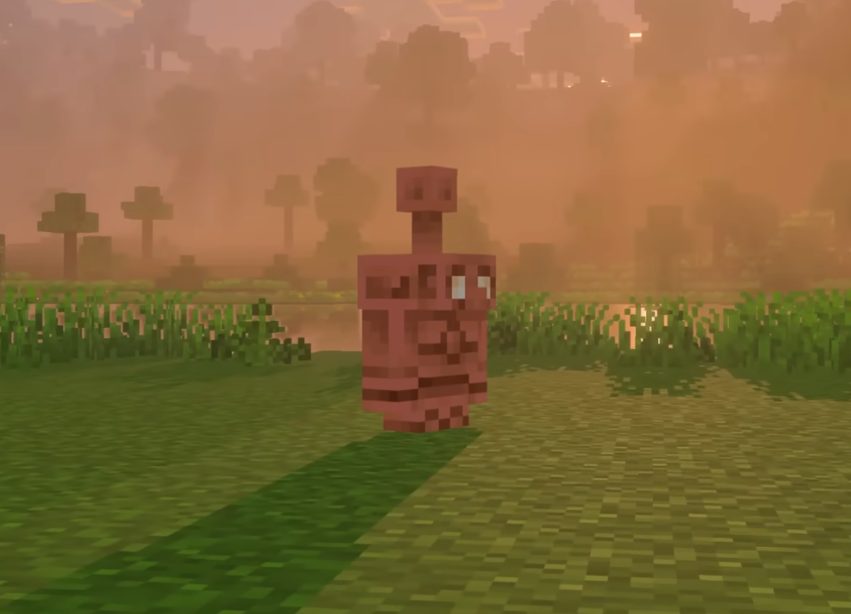
Over time, a Copper Golem fully oxidizes into a Copper Golem Statue block and freezes in a random pose.
-
You can scrape oxidation with an axe (and wax to lock a state), effectively reanimating the golem when conditions allow.
-
Comparators read different signals per pose, giving redstone builders a compact “state encoder” in block form.
Shelf (utility + display)
-
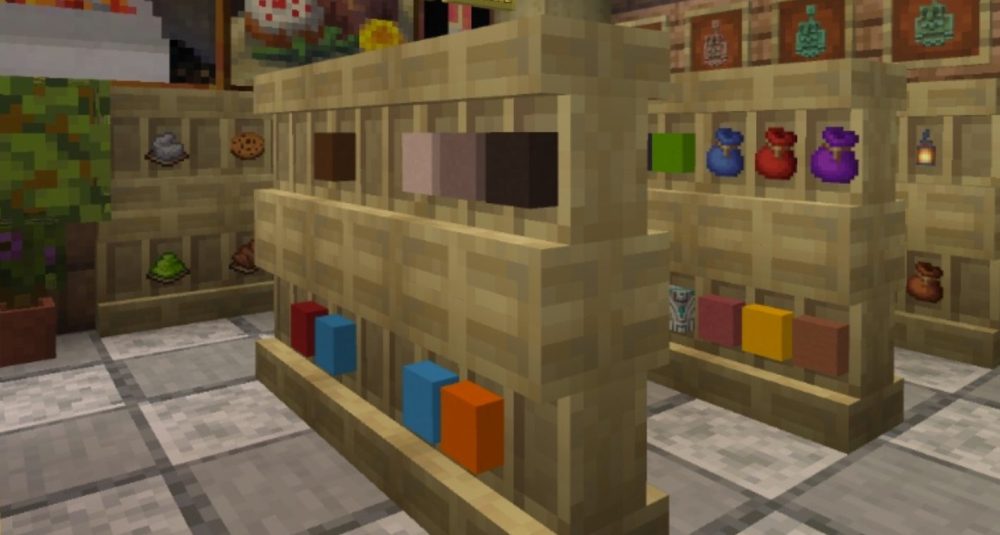
A craftable block built from stripped wood variants (including stripped bamboo) that holds three item stacks and shows them on the model.
-
When powered, neighboring Shelves link so a single interaction can hot‑swap items with your hotbar. The more connected Shelves, the more slots get swapped, perfect for quick tool/material loadouts.
Rollout note
-
Preview/Beta updates roll out staggered by platform and region. If you don’t see 1.21.110.20 immediately, give it a bit of time, no extra steps are required on your side beyond installing Preview (or opting into Beta on Android).
Why This Update Matters
-
Redstone, simplified: Pose‑based comparator output on statues turns clunky mode‑selectors into a single decorative block. Build compact control panels, step‑through logic, or “status to signal” displays without bulky translators.
-
Faster building flow: Linked Shelves let you stage materials and switch tasks with one interaction—terraform for a minute, swap, then detail, all without menu juggling.
-
Safer experimentation: Because Preview is a separate installation on console/PC/iOS, you can play with new mechanics while keeping your long‑term survival saves untouched.
TIP
Build Ideas & Redstone Tips
-
Workshop presets: Place 2–3 Shelves by your crafting area. Power them to link and keep distinct “kits” (mining, building, redstone). One tap swaps your hotbar for the next phase.
-
Mode dials with statues: Assign statue poses to machine “modes” (sort, smelt, brew, store). Run a comparator line to route signals to different circuits.
-
Living exhibits: Build a gallery where Copper Golems naturally age into statues—then scrape them back to life for occasional “moving day” events.
Backup & Troubleshooting Guide
-
Backups first (especially Android Beta): Even separate‑install Preview can see bugs. Export prized saves before testing, and use copies.
-
Can’t find Preview on console? Confirm you have a digital license or Game Pass. Disc‑only ownership doesn’t include Preview access.
-
iOS slot full? That’s normal - TestFlight seats are limited. Try again later; seats reopen periodically.
-
Features missing? Rollouts land at different times. Make sure you actually launched Minecraft Preview (or enabled Beta on Android), not your retail Bedrock app.
-
Switching off Android Beta: Leave the Beta in Google Play and wait for the store to propagate the normal build; your saved backups let you restore if something went wrong.
Result
-
Preview - separate app on Xbox/PlayStation/Windows/iOS; Beta replaces the app on Android.
-
Latest Preview build: 1.21.110.20 (released July 22, 2025).
-
Headline features: Copper Golem -> Statue (poses with comparator signals); Shelf (3‑slot display + hotbar hot‑swap when linked and powered).
-
Experimental toggle: No longer required for these features in Preview/Beta.
-
Access: Digital ownership or subscription paths work; disc‑only doesn’t. iOS seats limited via TestFlight.
Enjoyed reading this guide? Check out our Blog section to discover even more fascinating insights about your favorite games! Play together with GODLIKE.
Read Next
-
Copper Golem in Minecraft (2025): Status, Mods, Oxidation, Statue Build & FAQ
TL;DR There is no copper golem in vanilla Minecraft server hosting (Java or Bedrock) as of 2025. It was a Mob Vote 2021 candidate and didn’t make it into the base game. You can still use…
-
Minecraft Mods (1.21): Best Mods, Modpacks, and How to Install (Fabric, Forge, NeoForge)
TL;DR In Minecraft server hosting Java mods are .jar files loaded by Fabric, NeoForge (modern Forge fork), Forge, or Quilt. Put the mod in the /mods folder for the chosen profile. Minecraft: Java Edition is…
-
Smithing Table in Minecraft (1.21+): Recipe, Uses, Templates & Toolsmith Guide
TL;DR In Minecraft server hosting, the block’s core purpose is upgrading gear via smithing templates not repairing. The crafting recipe is simple: two iron ingots plus four planks of any wood. What it is: a…


