


 en | USD


 CHAT WITH GODLIKE TEAM



Why Use a Crafter in Minecraft: Explained

- 4 min read
- 1 views
- 0 likes
The Benefits and Value of the Crafter
From the very beginning of modified Minecraft, there has been a distinct fascination with automating the traditionally manual crafting process. There’s something incredibly satisfying about turning one of the most hands-on tasks in the game into a smooth mechanical operation. Over time, nearly every popular modpack has included its version of automatic crafting. Mojang, ever attentive, decided to introduce its vision of automatic crafting into the base game. Let’s dive into the most anticipated addition of version 1.21 — the Crafter!
TIP
The Crafter Block
The Crafter is a compact yet efficient storage block designed to simplify crafting tasks. Functioning similarly to a regular crafting table, it performs crafting only when powered, outputting finished items either as dropped items or directly into an adjacent container. The Crafter’s inventory slots can be locked, allowing players to protect items from external devices like hoppers or droppers. Locked slots are ignored by the crafting recipe.
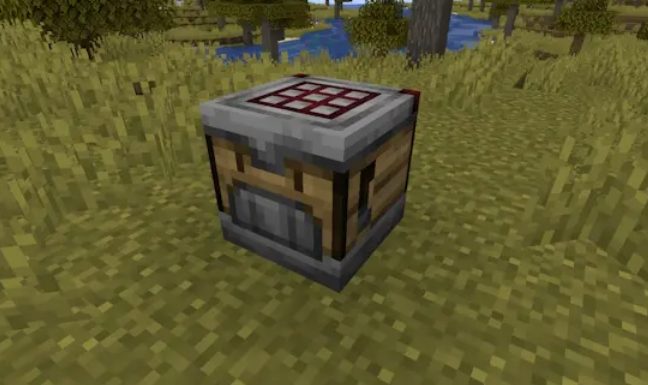
The Crafter features the familiar 3x3 inventory grid, and its interface resembles a standard crafting table. Players can toggle the activity of each slot by simply clicking on it when empty. Disabled slots prevent the placement of items, adding extra control. External components such as hoppers and droppers can both fill and empty the Crafter’s inventory, following a top-left-to-bottom-right order for active slots. When items are added to the Crafter, they first stack into existing stacks with the lowest count before occupying empty slots.
Redstone Integration
The Crafter’s complexity integrates seamlessly with Redstone mechanics. When it receives a Redstone signal, the Crafter processes one recipe from its inventory, and the finished items are ejected from its main "face." If the Crafter is facing a container — whether another Crafter or a different block — the finished item is transferred directly into it. If the container is full or incompatible with the item, the Crafter simply drops the product. This interaction resembles the behavior of droppers but with enhanced functionality. Additionally, any by-products from the recipe, such as empty bottles from honey blocks or buckets from cakes, are ejected separately.
TIP
Crafting the Most Powerful Sword in Minecraft
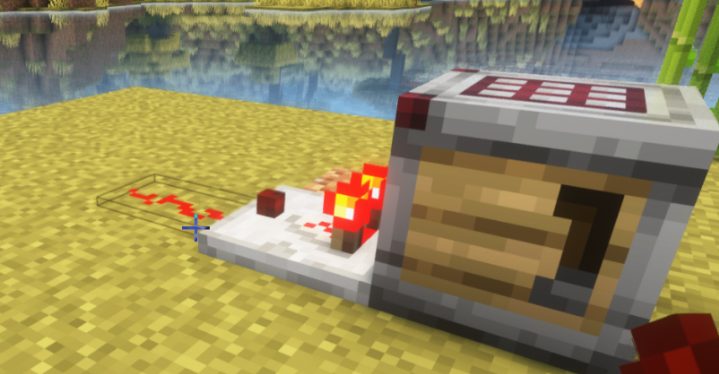
For recipes requiring specific item placement, the Crafter demands the same level of attention to detail as manual crafting — the arrangement of items in the inventory matters. Hoppers placed beneath the Crafter can collect raw materials from the crafting grid but do not take the finished item. It’s important to note that, in Java Edition, the Crafter is unaffected by quasi-connectivity — a rare bug associated with droppers and pistons, which allows them to react to signals above them. This does not apply to the Crafter.
Comparators can interact with the Crafter, emitting a Redstone signal proportional to the number of occupied or disabled crafting slots. An empty Crafter with no locked slots emits no signal, while a fully filled Crafter generates a signal with a strength of nine. This opens up a wide range of possibilities for creating complex Redstone mechanisms with the Crafter and comparators.
Conclusion
That’s it! The Crafter promises to be one of the most revolutionary blocks in Minecraft’s history, forever changing the way we approach crafting in the game. Who would have thought that automatic crafting would transition from the realm of mods to an official game feature? Minecraft’s evolution continues, and we are witnessing a beautiful blend of modding and vanilla gameplay. I hope this article provided you with valuable insights into Minecraft’s new block. Happy crafting and enjoy the game!
Read Next
-
Copper Golem in Minecraft (2025): Status, Mods, Oxidation, Statue Build & FAQ
TL;DR There is no copper golem in vanilla Minecraft server hosting (Java or Bedrock) as of 2025. It was a Mob Vote 2021 candidate and didn’t make it into the base game. You can still use…
-
Minecraft Mods (1.21): Best Mods, Modpacks, and How to Install (Fabric, Forge, NeoForge)
TL;DR In Minecraft server hosting Java mods are .jar files loaded by Fabric, NeoForge (modern Forge fork), Forge, or Quilt. Put the mod in the /mods folder for the chosen profile. Minecraft: Java Edition is…
-
Smithing Table in Minecraft (1.21+): Recipe, Uses, Templates & Toolsmith Guide
TL;DR In Minecraft server hosting, the block’s core purpose is upgrading gear via smithing templates not repairing. The crafting recipe is simple: two iron ingots plus four planks of any wood. What it is: a…


