


 en | USD


 CHAT WITH GODLIKE TEAM



What is Rust Staging Branch: All You Need to Know

- 4 min read
- 1 views
- 2 likes
Rust Staging Branch
Rust server hosting is a constantly evolving game, with developers regularly introducing new features, fixing bugs, and adjusting game balance. Before these updates make it into the live version, they go through a testing phase in a separate version called Rust Staging Branch.
TIP
This test build allows players to preview upcoming content while helping developers ensure stability and polish before a full release.
What Is Rust Staging Branch?
Rust Staging Branch is a separate game build running alongside the main version. It includes the latest features and changes that haven’t been fully tested yet, giving players early access to experimental content.
The primary goal of this branch is to identify bugs, fine-tune mechanics, and gather community feedback before pushing updates to the live servers.
Why Is Staging Branch Important?
-
Early Access to Updates
Players in the Staging Branch get to test new features before they are officially released. This includes new items, building mechanics, weapons, vehicles, and more. -
Development Testing Ground
Developers rely on Staging Branch to test and optimize new features. Without this phase, major updates could introduce game-breaking bugs. -
Bug Detection and Balance Adjustments
Players can report issues and inconsistencies, helping the Facepunch team refine the final update. -
Independent Testing Environment
The Staging Branch runs on separate servers, meaning progress and changes here do not affect the main game. This allows for risk-free testing.

Key Features of Rust Staging Branch
1. Separate Installation
Rust Staging Branch installs separately from the main game and appears as an independent client in your Steam library. This prevents conflicts with the live version.
2. Available to All Rust Owners
Anyone who owns Rust on Steam can access the Staging Branch for free—no additional purchases or subscriptions are required.
3. Frequent Updates
Unlike the main game, which receives major patches once a month, Staging Branch is updated much more frequently, sometimes multiple times a week.
4. Possible Bugs and Instability
Because it’s a testing ground, the Staging Branch can be unstable. Players may experience crashes, performance issues, and unfinished mechanics.
5. Dedicated Test Servers
This branch operates on separate servers, ensuring that experiments and changes don’t impact the primary game world.
How to Install Rust Staging Branch?
If you want to try the test version, follow these steps:
1) Open Steam and go to your game library.

2) Find Rust Staging Branch in the list (it’s available to all Rust owners).
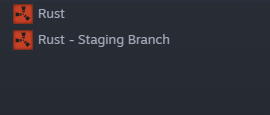
3) Click “Install” and wait for the download to complete.
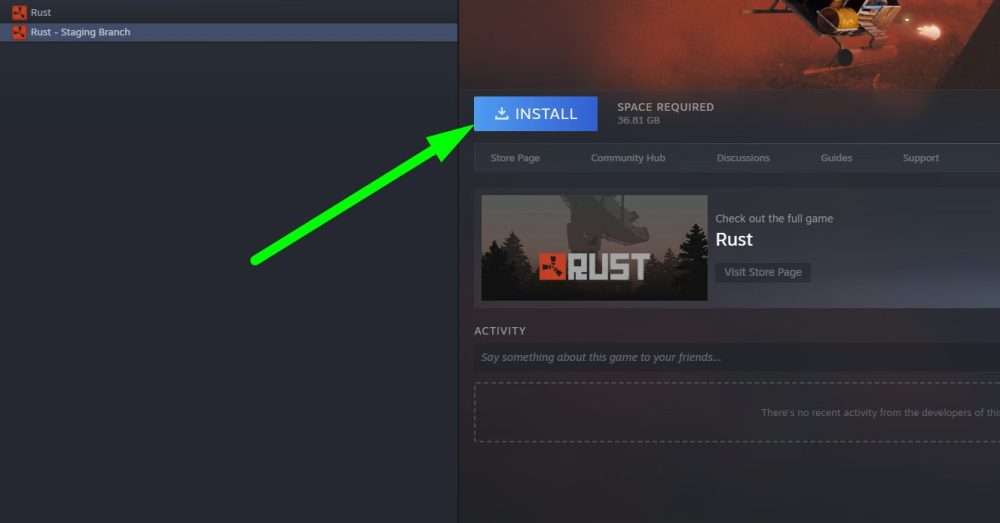
4) Launch the game just like you would with the main version.
Who Should Use Staging Branch?
The Staging Branch is ideal for:
- Players eager to try new features before release.
- Those who want to help developers by testing and providing feedback.
- Streamers and content creators showcasing upcoming content.
- Modders and server owners preparing for future updates.
If you prefer a stable experience without bugs, it’s best to wait for official updates in the main Rust version.
Result
Rust Staging Branch is a valuable tool for both developers and players, offering a sneak peek at future updates while helping refine the game before release. Despite occasional bugs and instability, it provides a unique opportunity to be at the forefront of Rust’s development.
Enjoyed reading the article? Visit our Blog section to learn even more interesting things about your favorite games! Play together with GODLIKE.
Read Next
-
Best Rust Server Hosting (2025): 12 Providers Compared & Ranked
Rust Server Hosting If you’re spinning up a Rust server in 2025 whether a small private server for friends or a multi-map cluster with a serious player base the right host decides how smooth the…
-
Complete Rust Tugboat Guide: Location, Customization & Survival Tips
With the arrival of Tugboats, Rust server hosting has introduced a fresh approach to how players handle movement and strategy on the water. These boats aren’t just for travel anymore, they’ve become valuable tools for…
-
Rust Jungle Update Overview
Rust Update Facepunch Studios has once again reimagined survival gameplay with their daring new addition to Rust server hosting: the Jungle Update. The Jungle Update is expected to release as part of Rust’s May update….


